
How to find your invoices
In the customer portal, you can easily view your invoices and contract documents and download them as PDFs.
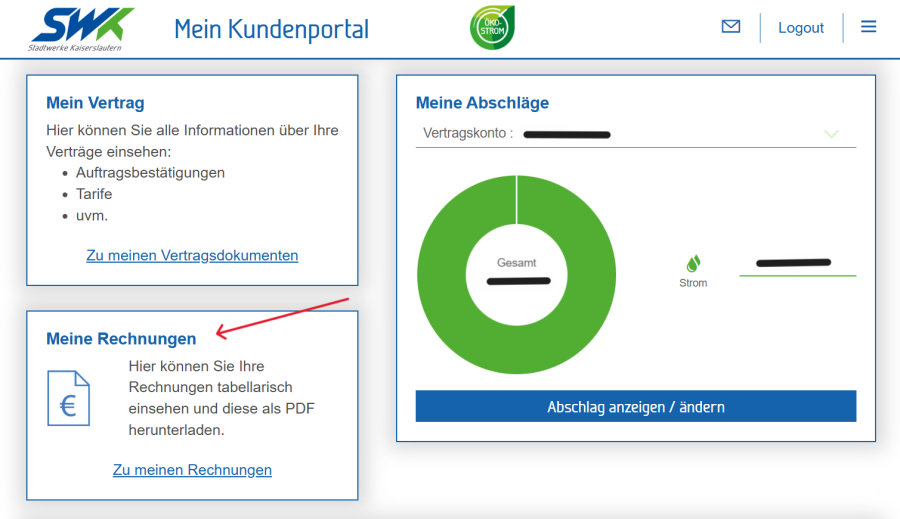
Log in to the customer portal.
Scroll down to ‘My invoices’.
Click on ‘My invoices’.
You will be taken to the ‘My Documents’ section
Select the ‘Invoices’ menu item on the left.
Your invoices will then be displayed in a table.
Download invoices
A PDF file is available for download with every invoice.
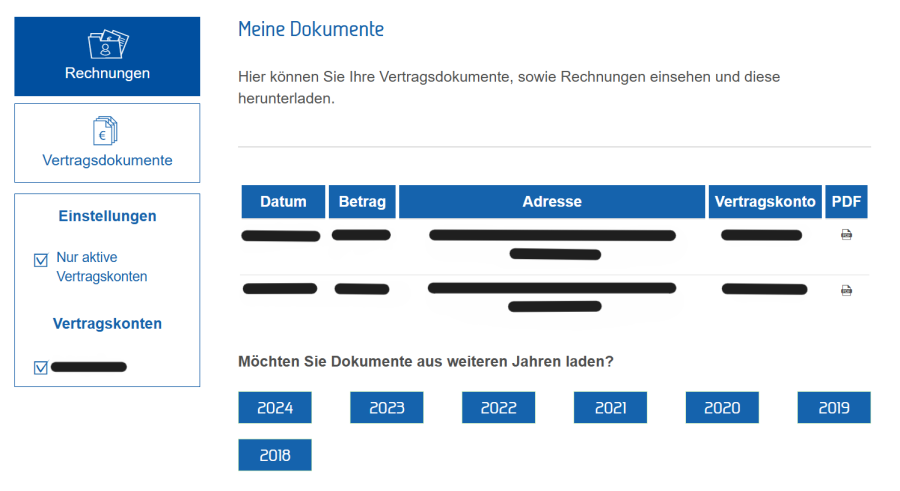
The overview includes, amongst other things:
Invoice date
Invoice amount
Address of the consumption point
Contract account
You can download and save the relevant invoice by clicking on the PDF icon.
If there are several contract accounts, you can narrow down the display using the ‘Contract Accounts’ section.
You can also choose to display only active contract accounts.
View further documents
As well as invoices, you can also view your contract documents in the ‘My Documents’ section. To do this, select the ‘Contract Documents’ menu item.
These can also be downloaded as PDF files and saved.
